
For years, multi-factor authentication (MFA) has been one of the best ways to protect business accounts—and it still is.
But there’s a shift happening.
At ComputerWerx, we’re seeing more cases where attackers aren’t trying to break MFA—they’re working around it using smarter phishing techniques.
That’s where the idea of “phishing-resistant MFA” comes in.
What does “phishing-proof MFA” actually mean?
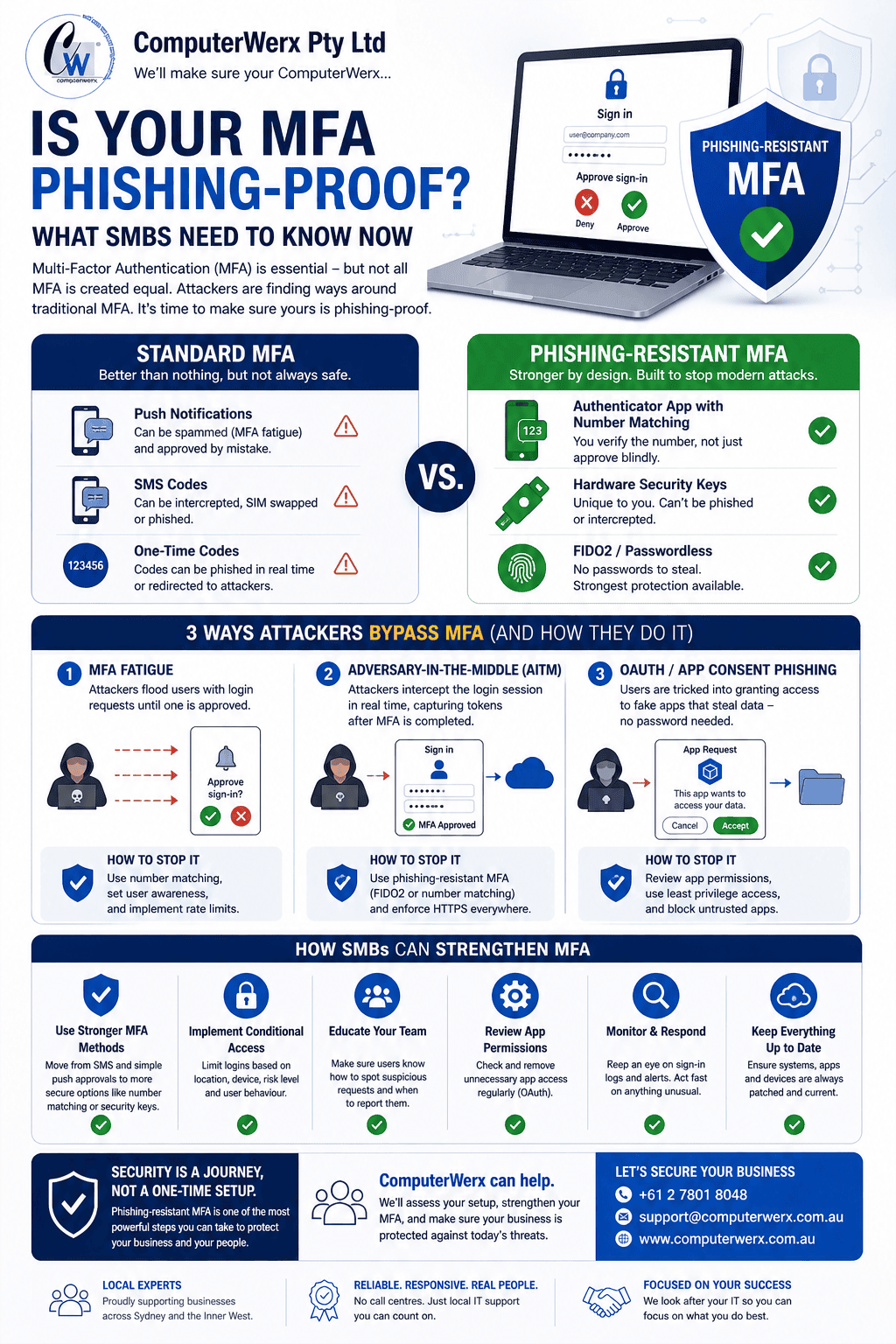
Not all MFA is created equal.
Traditional MFA methods—like push notifications or SMS codes—add a layer of protection, but they can still be tricked or abused.
Phishing-resistant MFA is designed so that:
In simple terms—it’s much harder for attackers to bypass, even with advanced phishing.
Where standard MFA falls short
Here’s what we’re seeing more often across SMBs:
MFA fatigue (prompt spamming)
Users get repeated login requests and eventually approve one—often without realising.
Adversary-in-the-Middle (AiTM)
Attackers intercept login sessions in real time, capturing tokens even after MFA is completed.
Fake app approvals (OAuth phishing)
Users grant access to what looks like a legitimate Microsoft app—no password required.
So what should SMBs be doing?
This doesn’t mean MFA is broken—it just means it needs to be set up properly and strengthened.
At ComputerWerx, here’s how we approach it:
Move to stronger MFA methods
Number matching, authenticator apps, or hardware-based authentication instead of basic push approvals.
Reduce reliance on SMS and simple prompts
These are the easiest for attackers to exploit.
Tighten conditional access policies
Limit logins based on location, device, and risk level.
Review app permissions regularly
OAuth access is one of the most overlooked risks.
Educate users (practically)
Staff should know:
A quick example
We worked with a business that had MFA enabled across all users—but still had suspicious login activity.
The issue wasn’t the technology—it was how it was being used.
After tightening MFA methods, locking down access policies, and running short user awareness sessions, the problem stopped almost immediately.
Final thought
MFA is still essential—but it’s no longer the finish line.
The real question for SMBs now is:
“Is our MFA actually phishing-resistant?”
At ComputerWerx, we help businesses move from basic protection to practical, real-world security that stands up to today’s threats.
If you’re not sure where you sit, it’s worth taking a closer look.